
技术详情
Features: 特征:
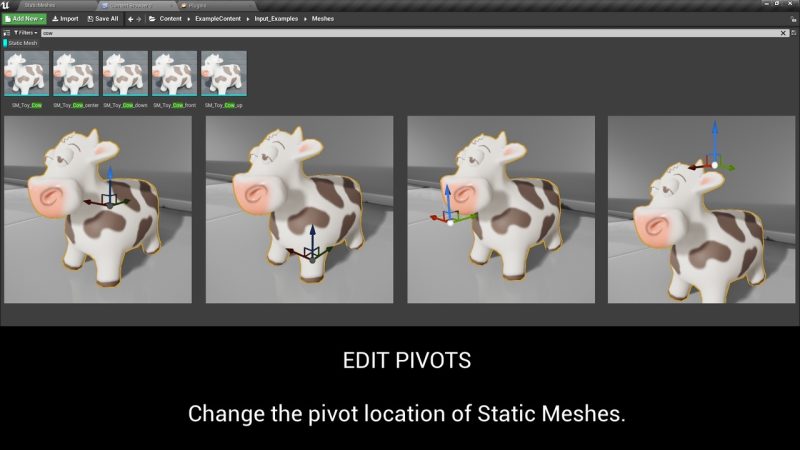
- Move pivot of Static Mesh assets by given offset
按给定偏移移动静态网格体资源的枢轴 - Move pivot of Static Mesh assets related to their bounds
移动与其边界相关的静态网格体资源的枢轴 - Change pivot only on selected axis
仅在选定轴上更改枢轴 - Save pivot changes to source Static Mesh asset or create new
将枢轴点更改保存到源静态网格体资产或创建新的 - Modify pivots of multiple assets at the same time
同时修改多个资产的透视表 - No need to place the assets on level, the scripts work in the Content Browser
无需将资源放置在关卡上,脚本可以在 Content Browser (内容浏览器) 中使用 - No need for external content creation software
无需外部内容创建软件
How to set up and use:
如何设置和使用:
- Open your vault, search for the plugin and select “Install to Engine” (select your engine version)
打开您的保险库,搜索插件并选择“Install to Engine”(选择您的引擎版本) - After opening your project, go to Edit/Plugins and under “Installed” category you have to enable the Easy Pivot Tool plugin.
打开项目后,转到 Edit/Plugins,然后在 “Installed” 类别下 ,您必须启用 Easy Pivot Tool 插件 。 - Restart the editor 重新启动编辑器
- In the Content Browser, select the target static mesh, right click on it and under category “Scripted Actions” you can find the plugin functions
在 内容浏览器(Content Browser) 中,选择目标静态网格体,右击它,然后在“脚本作(Scripted Actions)”类别下找到插件函数 - Alternatively you can use the Editor Utility Widget here: Pivot Tool Content/Blueprints/EUW_PivotTool
或者,你可以在此处使用编辑器工具小组件:枢轴工具内容/蓝图/EUW_PivotTool
Code Modules: 代码模块:
- PivotTool (Editor) PivotTool (编辑器)
Number of Blueprints: 1 蓝图数量:1
Number of C++ Classes: 2
C++ 类数:2
Supported Development Platforms: Windows, MacOS
支持的开发平台: Windows、MacOS
Supported Target Build Platforms: All (Editor plugin)
支持的目标构建平台:全部(编辑器插件)
Important/Additional Notes:
重要/附加说明:
- Full C++ source code included
包括完整的 C++ 源代码 - The static mesh assets in the images are not included in the pack
图像中的静态网格资源不包含在包中
兼容性
支持的虚幻引擎版本
4.27和5.0 – 5.5
声明:分享资源来源于公开互联网搜集和网友提供,仅用于学习和研究使用,不得用于任何商业或者非法用途,其版权争议与本站无关。您必须在下载后的24个小时之内,从您的电脑中彻底删除上述内容! 版权归原作者及其公司所有,如果你喜欢该资源,请支持并购买正版,得到更好的服务。
